How to Enable DNS Over HTTPS in Windows 11 With Cloudflare
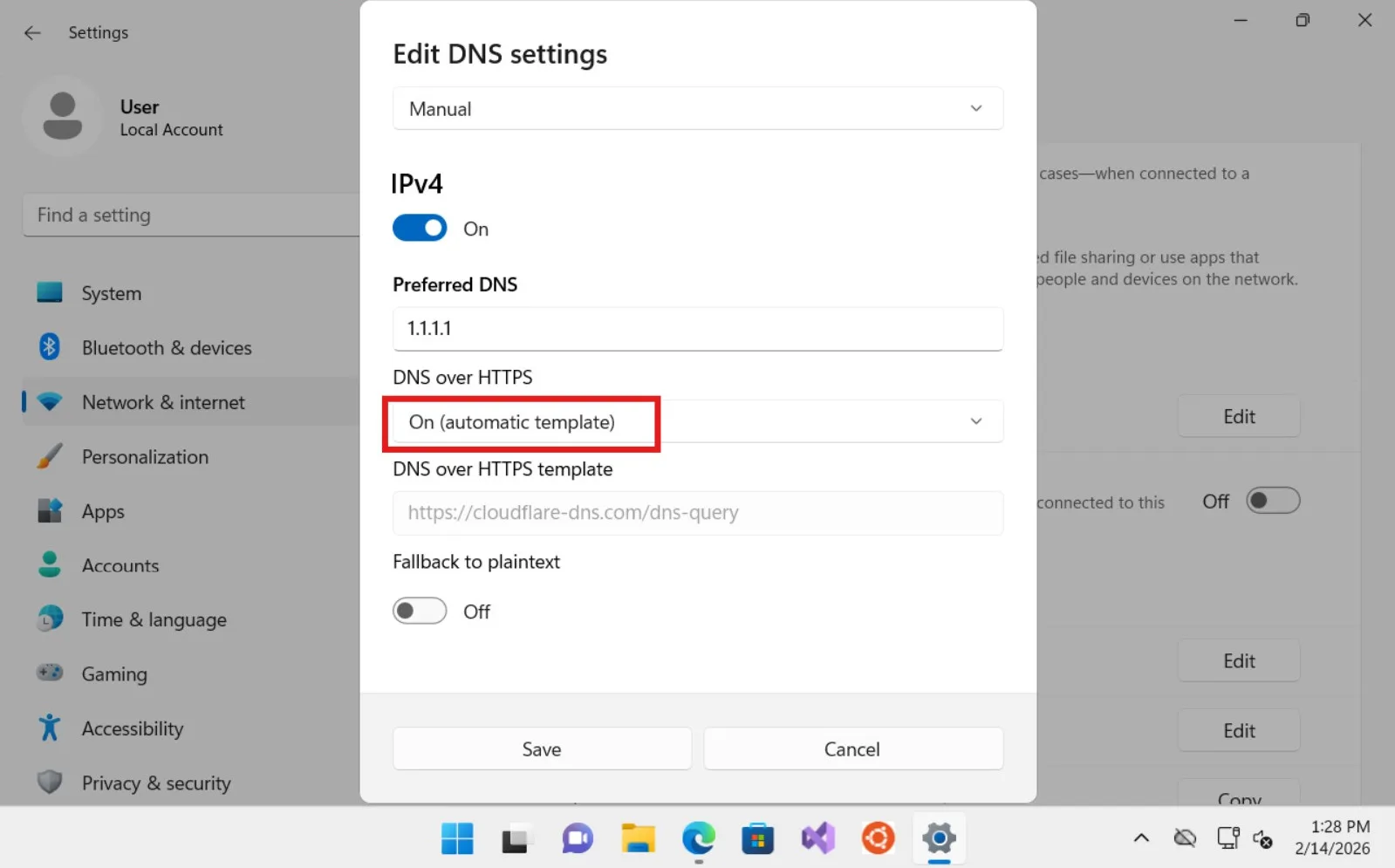
To enable DNS over HTTPS in Windows 11 with Cloudflare, open Settings > Network & internet, select your active Wi-Fi or Ethernet connection, edit DNS server assignment, choose Manual, and enter 1.1.1.1 and 1.0.0.1. Set DNS over HTTPS to On (automatic template) and turn Fallback to plaintext off if you want Windows to avoid unencrypted DNS when secure DNS is unavailable.
This gives Windows a system-level encrypted DNS configuration without installing the Cloudflare WARP app. It can prevent people on the local network from casually reading or altering your DNS requests, but it is not a VPN: websites can still see your public IP address, and your other internet traffic is not routed through Cloudflare WARP.
What you need before changing DNS
Windows 11 supports DNS over HTTPS (DoH) in its network settings. You need administrator access and a working internet connection. Write down any DNS addresses already configured so you can restore them if a work network, parental-control service, or internet provider depends on custom DNS.
The standard Cloudflare resolver uses these addresses:
| Protocol | Preferred DNS | Alternate DNS |
|---|---|---|
| IPv4 | 1.1.1.1 |
1.0.0.1 |
| IPv6 | 2606:4700:4700::1111 |
2606:4700:4700::1001 |
These are the current addresses listed in Cloudflare’s official Windows setup guide. Configure IPv6 only when your connection uses it; the IPv4 pair is enough for an IPv4 connection.
How to enable Cloudflare DNS over HTTPS in Windows 11
- Press Windows + I to open Settings.
- Select Network & internet.
- Open Wi-Fi and select the connected network, or select Ethernet if the PC uses a cable.
- Find DNS server assignment and select Edit.
- Change the drop-down menu from Automatic (DHCP) to Manual.
- Turn on IPv4.
- Enter
1.1.1.1under Preferred DNS. - Enter
1.0.0.1under Alternate DNS. - For each address, choose On (automatic template) under DNS over HTTPS.
- Choose whether Windows may fall back to plaintext DNS, then select Save.
Microsoft documents the same controls in its current guide to essential network settings in Windows. The automatic template option tells Windows to use its recognized DoH endpoint for the selected resolver, avoiding the need to type a URL manually.
Should you turn off fallback to plaintext?
For the strongest privacy setting, turn Fallback to plaintext off. If Windows cannot reach Cloudflare securely over HTTPS, DNS requests will fail instead of being sent unencrypted.
Leave fallback on only when uninterrupted connectivity matters more than guaranteeing DNS encryption. With fallback enabled, browsing may continue during a DoH problem, but the affected DNS lookups can be visible to the network.
Microsoft describes the trade-off plainly: with fallback on, an unsuccessful HTTPS lookup can be retried without encryption; with it off, the query is not sent when encrypted DNS is unavailable.
Optional: add Cloudflare IPv6 DNS
If your internet connection uses IPv6, return to the same manual DNS dialog and turn on IPv6. Enter:
- Preferred DNS:
2606:4700:4700::1111 - Alternate DNS:
2606:4700:4700::1001
Select On (automatic template) for DNS over HTTPS and choose the same plaintext-fallback policy you used for IPv4.
Do not enter IPv6 addresses merely because the option exists. If your provider or router does not offer working IPv6 connectivity, the IPv4 configuration is the relevant one. Windows can show whether IPv6 is active in the connection properties.
How to verify that Cloudflare encrypted DNS is working
Saving the addresses proves only that Windows accepted the configuration. Test the resolver afterward:
- Close and reopen your browser.
- Visit Cloudflare’s 1.1.1.1 connection test.
- Confirm that the page reports a connection to 1.1.1.1.
- Check the DNS-over-HTTPS result, not just the resolver name.
- Open several normal websites to confirm that name resolution works.
Cloudflare’s verification documentation says the test also shows which Cloudflare data center handles the requests. The nearest data center can change, so treat that detail as diagnostic information rather than a permanent setting.
You can also open Command Prompt and run:
ipconfig /all
Look at the active Wi-Fi or Ethernet adapter and confirm that its DNS Servers field lists the Cloudflare addresses. This verifies which resolver Windows is configured to use; use Cloudflare’s browser test to check whether the connection is encrypted.
DNS over HTTPS vs. regular 1.1.1.1
Changing the resolver to 1.1.1.1 and enabling DoH are related but separate steps.
| Setup | Resolver | DNS transport |
|---|---|---|
| Automatic DNS from router | Usually ISP or router | Depends on the network |
| 1.1.1.1 with DoH off | Cloudflare | Traditional plaintext DNS |
| 1.1.1.1 with DoH on | Cloudflare | Encrypted HTTPS |
Cloudflare explains that DoH wraps DNS queries in HTTPS, normally using port 443, to protect them from observation and alteration while traveling between the device and resolver. The full technical explanation is available in its DNS over HTTPS documentation.
What encrypted DNS protects—and what it does not
DNS translates a domain such as allyourtech.com into an IP address. Traditional DNS can expose those lookups to the local network. DoH encrypts that specific exchange.
It can help protect against:
- Passive monitoring of DNS queries on an untrusted local network.
- Simple manipulation of DNS replies between the PC and the resolver.
- Some forms of ISP or hotspot DNS redirection.
It does not:
- Hide your public IP address from websites.
- Encrypt traffic to a website that does not use HTTPS.
- Make malicious websites safe.
- Provide anonymity.
- Replace antivirus, browser updates, or careful link checking.
- Guarantee faster browsing.
If you need all traffic to stop when a VPN disconnects, that is a different control. See our guide to Always-on VPN and blocking connection leaks on Android for the distinction between DNS privacy and full-tunnel protection.
Cloudflare 1.1.1.1 vs. 1.1.1.1 for Families
The standard 1.1.1.1 resolver focuses on DNS resolution; it does not automatically block every malicious or adult domain. Cloudflare offers separate resolver addresses for filtering:
| Cloudflare option | Preferred IPv4 | Alternate IPv4 |
|---|---|---|
| Standard resolver | 1.1.1.1 |
1.0.0.1 |
| Block malware | 1.1.1.2 |
1.0.0.2 |
| Block malware and adult content | 1.1.1.3 |
1.0.0.3 |
Cloudflare lists the corresponding IPv6 addresses and explains the filtering behavior in its official resolver setup reference. DNS filtering is useful as an extra layer, but domain classification can make mistakes and should not be treated as complete endpoint protection.
System-wide DoH vs. browser Secure DNS
Windows DoH applies through the operating system’s DNS client for the configured network adapter. A browser may also have its own Use secure DNS setting and can choose a different provider.
For predictable behavior, decide which layer should control DNS:
- Windows setting: best when you want compatible applications to use the same resolver system-wide.
- Browser setting: useful when only browser lookups need a specific provider.
- VPN-provided DNS: normally preferable while connected to a trusted VPN because it can prevent lookups from leaving the tunnel.
If Cloudflare’s test gives an unexpected result, inspect the browser’s Secure DNS setting and any active VPN before changing Windows again.
Fix common DNS over HTTPS problems
The DNS over HTTPS option is missing
Confirm that the computer runs Windows 11 and install current Windows updates. Microsoft notes that the Settings-based DoH control is not available in Windows 10. A managed work or school PC may also hide or enforce DNS settings through policy.
Websites stop loading after you save
Return to DNS server assignment and check for typing errors. Temporarily turn plaintext fallback on to determine whether DoH itself is being blocked. If normal DNS works but encrypted DNS does not, the router, firewall, security product, or organization policy may be preventing the HTTPS resolver connection.
If all networking is unstable rather than only DNS, use our Windows guide to restore a missing Wi-Fi option and repair the network stack.
A hotel or public Wi-Fi sign-in page will not appear
Captive portals sometimes depend on their own DNS or intercept the first browser request. Cloudflare warns that fixed DNS settings can interfere with these sign-in networks. Temporarily switch DNS server assignment back to Automatic (DHCP), finish the portal sign-in, and then reapply Cloudflare only if the network permits it.
Before joining an unfamiliar hotspot, follow our checklist for checking whether public Wi-Fi is safe. Encrypted DNS helps, but it cannot verify that the hotspot itself is legitimate.
Cloudflare works in one browser but not another
The working browser may be using its own secure DNS provider. Compare the Secure DNS settings in both browsers, disable conflicting extensions temporarily, and repeat the Cloudflare connection test.
A work VPN stops resolving internal names
Corporate VPNs often supply private DNS servers for internal domains. Manually forcing 1.1.1.1 can prevent those names from resolving or send queries outside the intended corporate path. Restore automatic DNS and follow the organization’s VPN policy.
How to undo the change
- Open Settings > Network & internet.
- Select the active Wi-Fi or Ethernet connection.
- Next to DNS server assignment, select Edit.
- Change Manual to Automatic (DHCP).
- Select Save, then disconnect and reconnect the network.
This returns DNS selection to the router or network administrator. If you saved previous custom addresses, restore them instead when required.
Bottom line
The safest simple setup is Cloudflare’s 1.1.1.1 and 1.0.0.1 with DNS over HTTPS set to On (automatic template). Turn plaintext fallback off when you prefer failed lookups over silent downgrade to unencrypted DNS, then verify the result at 1.1.1.1/help.
Use the setting for DNS privacy, not as a substitute for a VPN or complete security suite. If a captive portal, company network, or VPN needs its own resolver, restore Automatic DNS rather than forcing Cloudflare.