How to Stop Instagram From Suggesting Your Account to Contacts
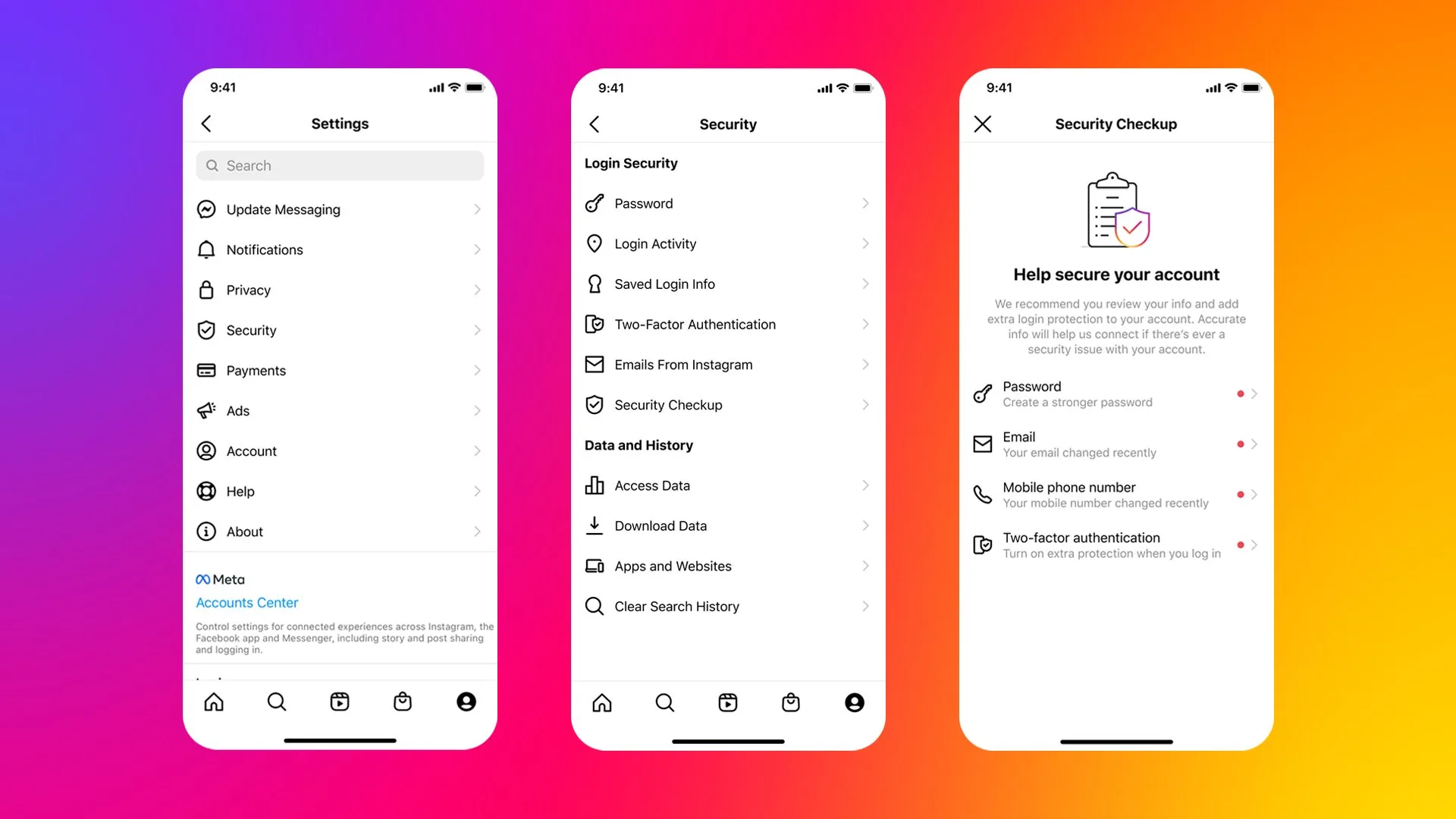
To reduce the chance that Instagram suggests your account to people in your phone contacts, turn off contact syncing on every device, delete contacts already uploaded to Meta, revoke Instagram’s Contacts permission in iOS or Android, and disable “Show account suggestions on profiles” on Instagram.com. These steps reduce several recommendation signals, but Instagram does not provide a single switch that guarantees your profile will never be suggested.
The most commonly missed step is deleting previously synced contacts. Meta states that turning syncing off does not remove contacts already uploaded, and deletion may take up to 90 days to complete.
Use this four-part Instagram privacy checklist
- Disconnect contact syncing inside Instagram.
- Delete previously uploaded contacts from a computer.
- Revoke Instagram’s Contacts permission at phone level.
- Turn off account suggestions on your Instagram profile.
Do all four if you want the strongest practical reduction. Performing only one leaves other routes open—for example, Instagram can still retain a previously uploaded address book after you switch off future syncing.
1. Turn off Instagram contact syncing
On iPhone or Android
- Open Instagram and go to your profile.
- Tap the three-line menu in the top-right.
- Open Accounts Center.
- Tap Your information and permissions.
- Open Upload contacts or Contacts syncing.
- Select the relevant Instagram account if asked.
- Turn off Connect contacts.
- Tap Disconnect to confirm.
Instagram’s menu labels can differ slightly by app version and region. If you cannot find the setting, use the Settings search box for “contacts” or update Instagram from the official app store.
Meta’s official contact-syncing instructions warn that disabling the toggle does not delete information that was synced earlier. It only stops future periodic uploads from that account and device.
Repeat this on every logged-in device
If the account is signed in on a second phone or tablet and contact syncing remains enabled there, that device may upload the address book again. Check every device where you use Instagram, including an old phone kept as a backup.
Also inspect every Instagram profile in your Accounts Center. A personal profile and a creator or business profile can have separate contact-upload settings even when they are used in the same app.
2. Delete contacts Instagram already uploaded
Meta currently directs users to delete synced contacts through Instagram.com on a computer:
- Go to Instagram.com and sign in.
- Open your profile.
- Click Edit profile.
- Click See more in Accounts Center.
- Open Your information and permissions.
- Select Manage contacts.
- Choose Delete all.
- Confirm the deletion.
Keep contact syncing switched off while deletion is processing. Otherwise, Instagram may upload the same address book again.
How long does deletion take?
Meta says it may take up to 90 days to complete deletion after the process starts. Recommendations based on those contacts may continue during part of that period. This means you should not expect every suggestion to disappear immediately after pressing Delete all.
Deleting your uploaded contacts also does not delete your information from someone else’s address book. If another person has your phone number or email saved and uploads their contacts, that can remain a separate connection signal.
3. Block Instagram from accessing phone contacts
Revoking device permission adds a second barrier. Even if an app setting changes after an update or another person uses the device, Instagram cannot read the address book without operating-system permission.
On iPhone
- Open the iPhone Settings app.
- Tap Privacy & Security.
- Tap Contacts.
- Select Instagram.
- Choose None or turn access off.
Some iOS versions also offer limited contact access. For maximum separation, use None. Limited access is useful only if you deliberately want Instagram to see a small selected group.
On Android
- Open Android Settings.
- Tap Apps.
- Select Instagram.
- Tap Permissions.
- Tap Contacts.
- Select Don’t allow.
On Samsung devices, the path is usually Settings → Apps → Instagram → Permissions. Other manufacturers may label it Permission manager. Search Settings for “Instagram permissions” if necessary.
Revoking Contacts permission does not remove your followers, messages, or posts. It mainly prevents the app from reading the address book for discovery and related features.
4. Turn off “Show account suggestions on profiles”
Instagram provides a separate profile recommendation control. Meta notes that the feature is available on the web and some devices, but may not appear in the Android app.
- Open Instagram.com in a browser and sign in.
- Go to your profile.
- Select Edit profile.
- Find Show account suggestions on profiles.
- Turn it off.
- Save the change.
The official Instagram account-suggestions guide says this setting controls whether similar profiles are suggested when someone follows or visits a profile. Turning it off can also stop your profile appearing in that specific suggestion surface.
This is not the same as hiding suggested posts in your own feed. “Not interested” changes what you see; it does not prevent other people from seeing your account as a recommendation.
Can you completely stop Instagram from recommending you?
No setting guarantees total removal from every Instagram recommendation surface. Contact syncing is only one input. Instagram can infer relevance from mutual followers, linked Meta accounts, interactions, searches, profile similarities, shared networks, and other activity.
Meta’s Suggested Accounts system card explains that an AI system selects and ranks suggested profiles. Meta does not offer a universal “never recommend my account” switch covering every context.
The realistic goal is to reduce discoverability through contacts and profile suggestions, not to create an invisible Instagram profile.
Does making your Instagram account private help?
A private account limits who can see your posts, Stories, Reels, and follower-only content. It does not hide everything. Your username, profile picture, bio, follower counts, and basic profile can still be visible, and the profile may still appear in search or suggestions.
To make the account private:
- Open Instagram Settings and activity.
- Tap Account privacy.
- Turn on Private account.
This is worthwhile for content privacy, but it should be combined with the contact and recommendation controls above.
Should you remove your phone number from Instagram?
Removing a phone number can reduce one direct identifier associated with the account, but do not remove your only recovery method. Meta allows you to remove a confirmed phone number or email only when another confirmed contact method remains.
Before changing the number:
- add and confirm an email address you control;
- enable two-factor authentication with an authenticator app or passkey if available;
- save recovery codes somewhere secure;
- review where you are logged in;
- make sure the old phone number is not your only way to recover the account.
If you rely on an authenticator, our guide explains how to move Google Authenticator to a new phone without losing codes.
Removing the number from your profile does not erase it from other users’ uploaded contact books. It also may not immediately remove historical recommendation signals.
Should you unlink Facebook from Instagram?
Accounts in the same Meta Accounts Center can use connected experiences such as cross-posting, profile syncing, and shared login features. If strict separation matters more than convenience, review Accounts Center → Accounts or Manage accounts and remove the connection you no longer want.
Before unlinking:
- create a separate password for each account;
- confirm each account has its own recovery email or phone number;
- check scheduled cross-posts and business tools;
- understand that shared login and profile syncing may stop.
Unlinking is not a guaranteed way to prevent all suggestions. It removes a connected-account relationship, but Meta may still use other signals permitted by its policies.
How to stop one specific person from finding you
If your concern is a particular person rather than general recommendations, blocking is more direct:
- Open that person’s Instagram profile.
- Tap the three-dot menu.
- Select Block.
- Choose whether to block only that account or other accounts they may create, if Instagram offers the option.
Blocking is account-specific, not identity-proof. The person may still use an unrelated account, view public information while logged out, or receive your details from someone else. Keep the account private and avoid a recognizable username or profile photo if separation is essential.
Why contact suggestions may still appear afterward
Suggestions can continue because:
- uploaded contact deletion is still processing;
- contact syncing remains active on another phone;
- a different Instagram profile is uploading the same address book;
- Facebook and Instagram remain connected in Accounts Center;
- another person uploaded your phone number or email;
- you share mutual followers or interaction history;
- your profile matches other recommendation signals.
Wait through the deletion period, then recheck every device and account. Do not repeatedly toggle contact syncing on for testing—it may restart uploads.
Will clearing the Instagram app cache delete synced contacts?
No. Clearing cache removes temporary files stored on the phone. It does not delete contacts already uploaded to Meta’s servers and does not automatically turn off account-level syncing.
Likewise, uninstalling Instagram is not enough. The server-side contact list can remain until you use Manage contacts → Delete all.
Does Instagram tell people you searched for them?
Instagram does not provide a standard notification saying that you searched for or viewed someone’s profile. However, seeing your account suggested to someone is not proof that a profile view caused it. Suggestions use multiple signals, and public anecdotes cannot reveal which signal produced a particular recommendation.
Avoid treating viral claims about “profile stalker lists” as confirmed features. Do not give your Instagram password to third-party apps promising to reveal profile visitors. Such tools can steal credentials or misuse your account. Apply the same checks described in our guide to evaluating browser extensions before installation.
Check what personal information is exposed elsewhere
Even after tightening Instagram, your phone number or address may be visible through search results, people-search sites, old profiles, or public records. If broader privacy is the goal, follow our guide to removing your phone number and home address from Google Search.
Final checklist
- Turn off Connect contacts for every Instagram profile.
- Repeat on every phone and tablet where the account is logged in.
- Delete uploaded contacts through Instagram.com.
- Wait up to 90 days for Meta’s deletion process.
- Revoke Contacts permission in iOS or Android.
- Disable Show account suggestions on profiles.
- Make the account private if content visibility matters.
- Review linked Facebook and Instagram accounts.
- Block specific people when necessary.
- Keep a secure recovery email and two-factor authentication enabled.
Bottom line
The strongest way to stop Instagram from suggesting your account to contacts is a combination of controls: disconnect contact syncing, delete the contacts already stored by Meta, revoke phone-level access, and turn off profile account suggestions. These steps substantially reduce contact-based discovery, but they cannot eliminate every recommendation because Instagram’s system uses more than your address book.